


Video Player & HD Downloader
3.335.00 Reviews
App Specs
- Version
- 18.0
- Updated On
- License
- Free
- Downloads
- 1,000,000+
- Developer
- Breed Vision
- Categories
- Video Players & Editors
- Platform
- Android
Screenshots
 Analysis by AppCompare
I tend to judge a video app less by its first few minutes than by whether it still earns a place on my phone once the novelty wears off. Video Player & HD Downloader makes a simple promise: help me watch videos and keep some available offline. That combination can be genuinely handy, but it also raises practical questions about where downloads come from, how much storage they use, and whether I need a separate player at all. My view is that this app is most appealing when local playback and saving videos are both part of your routine—not when you only watch through streaming services.
Why the first week can feel useful
When it comes to watching videos on your phone, having a reliable app that can handle a variety of formats and resolutions is key. That's where Video Player & HD Downloader steps in, promising not only seamless video playback but also the ability to download your favorite clips. I've spent some time diving into this app, and here’s the lowdown on what you can expect.
First Impressions and Interface
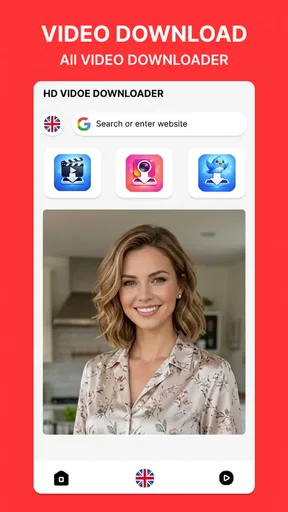
Right out of the gate, the app greets you with a clean and intuitive interface. No fuss, no muss—just straightforward navigation, which is exactly what you need when you’re dealing with video content. The minimalist design is a nice touch, allowing you to focus on finding and playing your videos without any unnecessary distractions.
The main screen provides easy access to your video library, downloads, and settings. I particularly appreciated how the app organizes your content, making it simple to locate your latest downloads or favorite clips. And speaking of downloads, the app supports a wide range of formats, ensuring that you can save and enjoy videos from pretty much any source.
That layout is especially useful during the first week, when I’m still deciding whether an extra player deserves a spot on my home screen. A quick route from the library to saved videos matters more than decorative menus when I’m trying to find one particular clip before leaving home. I’d start by opening a few videos already on the device, then try the download workflow with content I’m allowed to save. That small test tells me whether the app fits my habits without committing a large part of my storage to files I may never replay.
A realistic use for the download side is preparing for a commute: while connected to a stable network, I can save permitted video content, check that it appears in the downloads area, and then rely on the local copy when reception becomes unreliable. The useful detail is to confirm the file actually plays before heading out. A download that has only begun—or a clip that still depends on a connection—does not solve the offline problem. I also make a point of leaving room for other phone tasks rather than filling storage in one enthusiastic batch.
Playback Features
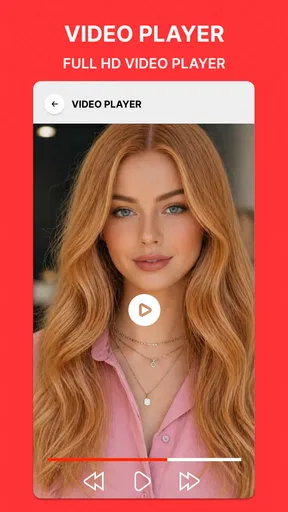
The core functionality of any video app is, naturally, its playback capabilities. Fortunately, this app delivers in spades. Whether you’re streaming or watching something you’ve saved, playback is smooth and stutter-free. The app supports resolutions up to 4K, so if you’ve got the screen to support it, your videos will look stunning.
Worth Reading Before You Choose

EA SPORTS FC Mobile 26 Is a Bigger Football Game, but It Takes Time

Flipboard Shows What News Apps Must Do Beyond the Feed

Switching to Android Auto Means Rethinking Your Driving Routine

Google Calendar Makes a Crowded Week Easier to Manage

Ludo King Makes the Most of the Minutes Between Plans

Baby Panda World Brings Quick Play to Modern Phones, but Its Game Library Feels Busy
There's a handy gesture control feature that allows you to adjust volume and brightness with a simple swipe. I found this particularly useful when binge-watching late at night without waking up everyone else in the house. Plus, the subtitle support is top-notch, allowing for easy toggling and customization. If you're someone who enjoys foreign films or needs subtitles for better comprehension, this feature is a real win.
In everyday use, gesture controls can be faster than reaching for small on-screen buttons, but they take a little care: a swipe intended to change brightness or volume is easy to make accidentally while holding the phone. I’d try the controls on a short clip first, especially if I watch one-handed. Subtitles also make the app more practical for shared spaces, though I’d check them early in a video rather than assuming every file has a matching subtitle track. The playback experience depends on the video itself as well as the player, so a high-resolution option cannot make a low-quality source look sharper.
Downloading Made Easy
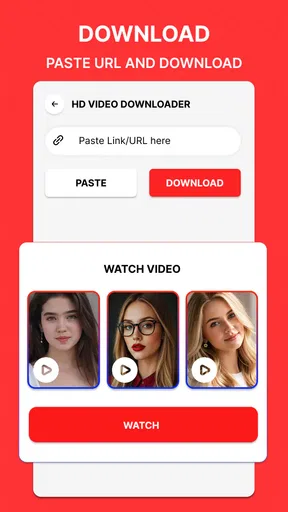
One of the standout features of the app is, of course, its downloading capability. The app makes it incredibly easy to download videos directly to your device for offline viewing. The download manager is efficient, allowing you to queue up multiple downloads and even pause and resume them if you need to manage your data usage.
What really impressed me was the speed of the downloads. Even larger files were handled swiftly, without compromising the quality of the video. This makes it a great option for those who travel frequently or have limited internet access and want to stock up on entertainment for the road.
For a better month-to-month routine, I would treat the download queue as a planning tool, not a permanent archive. I can queue a few videos before a trip, pause if I need to conserve data, and resume when conditions suit me; afterward, I can remove anything I have finished watching. That simple habit keeps offline viewing useful without letting old files accumulate unnoticed. It is also sensible to choose only content that is available for downloading and that I have permission to save. The downloader’s convenience does not change the rules set by a video source or creator.
Compared with a standard streaming app, a dedicated downloader can be more helpful when I need specific files available without dependable reception. Compared with a basic local video player, it offers a more direct route to saving videos as well as playing them. The trade-off is that a streaming service may be the simpler choice for browsing a large licensed catalogue, while a player focused on local files is enough if I never download. This app makes most sense between those habits: I already have videos to manage, and occasional offline access is worth an extra app.
Customization and Settings
The app doesn’t skimp on customization options either. You can tweak video settings to optimize performance based on your device’s capabilities. From adjusting the aspect ratio to fiddling with the audio tracks, there’s plenty of room to tailor the experience to your liking. For the more tech-savvy users, the advanced settings offer even more control over codecs and rendering options.
The settings menu is also where you’ll find options for parental controls, which can be a lifesaver if you’re sharing your device with younger users. You can easily restrict access to certain types of content, giving you peace of mind when the kiddos are using your phone or tablet.
I would approach those extra settings gradually rather than changing several at once. If a video looks stretched, checking the aspect ratio is a more targeted first step than experimenting with every playback option. Likewise, codec and rendering controls are useful only when I have a specific playback issue to address; leaving unfamiliar settings alone makes it easier to identify the cause if a file behaves differently. For a shared device, I’d test parental restrictions before handing it over and treat them as one layer of supervision, not a substitute for choosing suitable videos together.
What may wear thin over time
The main risk to lasting value is overlap. If I already use a streaming app for nearly everything and my phone’s built-in player handles the few local clips I keep, another video app may become one more icon to maintain. Downloading can also bring a quiet storage burden: files remain after the trip or viewing session unless I make a habit of clearing them. Pausing and resuming a queue helps with timing, but it does not remove the need to decide what is worth keeping.
There is also a difference between a capable player and a complete media library. If I want recommendations, a curated catalogue, or an organized collection that follows me across devices, a streaming service may suit me better. If I need a specialist archive for a large collection, I would compare the library tools and file-management workflow before moving everything over. This app’s appeal is more focused: playback plus downloads in one place. That focus is convenient, but it does not automatically replace every video tool.
Breed Vision is the developer behind this free app, which is rated for Everyone and sits in the video-player and editing category. It has a 3.3 average from around 4,600 ratings, with more than a million installs. I take that reception as a reason to try it with a small, ordinary task rather than assume it will suit every device or workflow. Version 18.0 is the current release, and the app requires Android 11 or later, so older Android phones are not a fit.
For someone deciding whether to install it, the practical questions are straightforward. Can it play the files I actually use? Does its download workflow work with the sources I rely on? Is the space used by offline copies worth the convenience? I’d answer those by testing one familiar local video and one permitted download, then checking both playback and cleanup. That is more useful than filling the phone with test files or changing advanced options before I know what I need.
Final Thoughts
In a world where video content is king, having a reliable app like this is a must. It combines robust playback features with a powerful download manager, all wrapped up in an easy-to-use package. While no app is perfect, this one comes pretty close for those who want a seamless video experience on their mobile devices.
Whether you’re a casual viewer or a serious cinephile, this app has something to offer. With its smooth performance, extensive format support, and user-friendly interface, it’s definitely worth checking out. Head over to your app store and give it a whirl—you might just find it becomes your go-to for all things video.
My longer-term recommendation is narrower than that last enthusiastic invitation: I’d keep it if I regularly play local videos and value having selected clips ready offline. I’d skip it if nearly all my viewing happens inside streaming services, if I rarely revisit saved files, or if I’m using an Android version below 11. The app’s strongest case is a recurring routine—prepare a few videos, watch them when convenient, and clear them when done. If that routine sounds like yours, it can earn its space after the first-week novelty fades.
Pros
- Supports multiple video formats seamlessly.
- Offers high-quality video playback options.
- User-friendly interface with intuitive controls.
- Allows background playback for multitasking.
- Customizable playback speed settings.
Cons
- Contains ads that can interrupt viewing experience.
- Limited support for certain subtitle formats.
- Requires in-app purchases for some features.
- Occasional buffering on slower connections.
- No built-in playlist creation feature.
FAQs for Video Player & HD Downloader
What video formats does the Video Player & HD Downloader support?
The Video Player & HD Downloader supports a wide range of video formats, including MP4, AVI, MKV, FLV, and more. Its versatility ensures compatibility with most video files, allowing users to enjoy their favorite content without worrying about format restrictions. This makes it a convenient choice for diverse video playback needs.
Can I download videos directly from online platforms using this app?
Yes, the Video Player & HD Downloader allows users to download videos directly from various online platforms. It offers a user-friendly interface for easy navigation and direct downloads, so users can save videos for offline viewing. Ensure that you comply with copyright laws and platform terms of service when downloading content.
Is the app free to use, or does it require a subscription?
The Video Player & HD Downloader is free to download and use, with basic features accessible to all users. However, there may be optional in-app purchases or a premium subscription that unlocks additional features, such as ad-free viewing and enhanced download speeds. Check the app’s store listing for detailed pricing information.
Does the app support high-definition (HD) video playback and downloads?
Absolutely, the Video Player & HD Downloader is designed to support HD video playback and downloads. Users can enjoy crisp, clear visuals and smooth performance on compatible devices. This feature is ideal for those who prioritize video quality, making it a top choice for HD video enthusiasts.
What are the storage requirements for installing the Video Player & HD Downloader?
The Video Player & HD Downloader typically requires around 50-100 MB of storage space for installation, depending on the device and operating system. Additionally, consider the storage space needed for downloaded videos. It's advisable to have sufficient storage available to ensure smooth app performance and ample room for media files.


